How small and medium businesses can build a practical, phased Zero Trust strategy that actually works.
🔍 Introduction: Why Zero Trust Is More Than a Buzzword
Zero Trust is everywhere. Since 2021, governments, cybersecurity vendors, and IT leaders have touted it as the gold standard for modern cyber defence. At its core, Zero Trust means: “Never trust, always verify.”
But despite its popularity, most small and medium-sized businesses (SMBs) that set out to “implement Zero Trust” end up overwhelmed, misinformed, or stuck in pilot mode — wasting time and money on solutions they can’t operationalize.
This article is your practical guide to cutting through the noise, understanding what Zero Trust really means, and building a roadmap that makes sense for your business.
💡 What Is Zero Trust, Really?
Forget the jargon — at a high level, Zero Trust is a mindset. It’s about:
- Assuming breach (someone is already in your system)
- Verifying everything (users, devices, apps)
- Limiting access (only the minimum needed to do a job)
This is not a tool. It’s a strategy that guides decisions across identity, access, network segmentation, device health, data protection, and monitoring.
🚧 Why Most SMBs Stall on Zero Trust
❌ 1. It’s Framed Like a Fortune 500 Project
SMBs often see Zero Trust guidance written for enterprises with large security budgets and teams of engineers. This leads to over-complication, vendor bloat, and unclear next steps.
❌ 2. Misalignment Between IT and Leadership
Organizations should also invest in employee development and security awareness, as attracting and retaining talent remains one of the challenges in what many consider the best career in cybersecurity field today.
❌ 3. The “All or Nothing” Mentality
Thinking you must do everything at once (identity, device, microsegmentation, monitoring, etc.) creates analysis paralysis.
✅ What SMBs Should Do Instead: A Phased, Purpose-Driven Approach
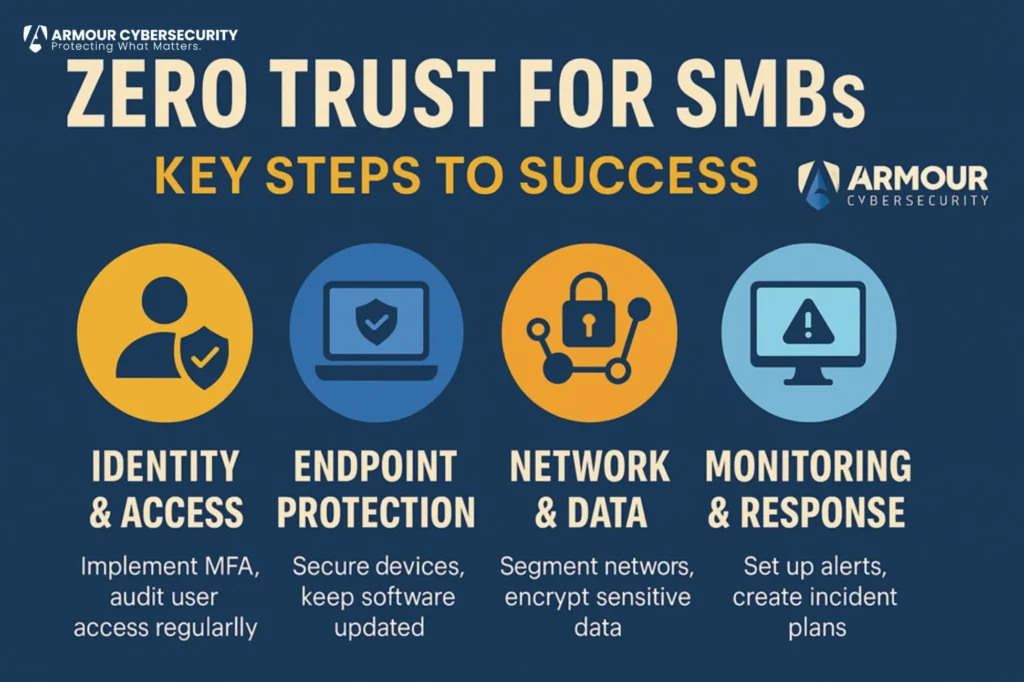
🔐 STEP 1: Start with Identity & Access Control
Goal: Know who’s logging in — and only allow what’s necessary.
- Enforce multi-factor authentication (MFA) for all users (especially admin and remote access)
- Implement least-privilege access: no one should have more access than they need
- Remove unused accounts and automate access revocation on employee exit
🔧 Tools to consider: Microsoft Entra, Okta, Duo, Google Workspace IAM
💻 STEP 2: Secure Your Endpoints
Goal: Ensure the devices accessing your systems are known, healthy, and protected.
- Require antivirus/EDR on all company-owned devices
- Block unmanaged or outdated devices from accessing critical systems
- Patch operating systems and applications regularly
🔧 Tools to consider: SentinelOne, CrowdStrike Falcon, Microsoft Defender for Business
🌐 STEP 3: Shrink the Attack Surface
Goal: Limit exposure across your network, apps, and data.
- Use network segmentation (e.g., separating guest Wi-Fi from internal traffic)
- Remove or lock down unused open ports and services
- Encrypt sensitive data in transit and at rest
🔧 Tools to consider: Firewalls with microsegmentation (e.g., Fortinet, Ubiquiti), VPNs with device trust
📊 STEP 4: Monitor, Audit, and Improve
Goal: See what’s happening — and respond quickly.
- Log and monitor sign-ins, privilege escalations, and data access
- Set up alerting for suspicious activity (e.g., impossible travel, repeated MFA failures)
- Conduct tabletop exercises for response readiness
🔧 Tools to consider: Microsoft Sentinel (for 365), Splunk, JumpCloud
💼 What Executives Need to Know
Even with a lean IT team, SMBs can absolutely adopt Zero Trust in a way that’s measurable and practical. But leadership must:
- Set the tone: Make Zero Trust a business priority, not an IT side project
- Define what “trust” looks like in your environment — for users, devices, vendors, and apps
- Allocate resources: Budget for identity, endpoint, and basic monitoring tools. Many SMBs also benefit from private security consulting to help prioritize investments and align Zero Trust initiatives with business objectives.
- Ask the right questions:
- Who has access to our sensitive data?
- Have executives and privileged users completed a personal cyber security risk assessment to identify vulnerabilities that could expose the organization?
- Do we have visibility into abnormal behavior?
🚀 Conclusion: You Don’t Need to Be Big to Be Secure
Zero Trust isn’t about buying the most expensive tech — it’s about changing how you think about access, risk, and trust.
For SMBs, the smartest path is to:
- Start small (identity + device health)
- Build confidence with early wins
- Scale intentionally over time
Security doesn’t start with the tools — it starts with clear priorities and executive commitment. Organizations often strengthen these initiatives through cybersecurity consulting services, executive personal cyber security risk assessment programs, and investment in talent entering what many view as the best career in cybersecurity.