Multi-factor authentication has been the cornerstone of Microsoft 365 security guidance for years. Enable MFA, the advice went, and you have closed the most common attack path. That advice is no longer sufficient.
In a concentrated three-day window between April 14 and April 16, 2026, a single AiTM phishing campaign harvested credentials and session tokens from more than 35,000 users across 13,000 organizations in 26 countries. Every one of those victims was using MFA. The campaign did not crack passwords or intercept authentication codes, it bypassed MFA entirely by stealing the session tokens that Microsoft issues after authentication is successfully completed.
This is the defining Microsoft 365 threat of 2026. AiTM, adversary-in-the-middle, phishing does not defeat your users’ MFA. It defeats the authentication model itself, by intercepting the proof of authentication rather than the authentication credentials. Canadian IT teams that have not yet adapted their M365 security controls to this threat model are operating with a significant and active exposure. Organizations seeking to reduce this risk often begin with a comprehensive M365 Security Optimization initiative focused on identity protection and configuration hardening.
| KEY STAT | AiTM phishing attacks increased 146% in the past year. Nearly 40,000 token theft incidents are detected daily across Microsoft environments. A new Phishing-as-a-Service platform called Kali365, first observed April 2026, is available via Telegram for as little as USD$250 for 30 days, making these attacks accessible to low-skill attackers at scale. FBI PSA May 2026 / Obsidian Security / TechTimes |
What is AiTM phishing and why does MFA not stop it?
Traditional phishing steals credentials, a username and password that an attacker can then use to log in. Traditional MFA defeats this by requiring a second factor, a code, a push notification, a hardware token, that the attacker does not possess. For years, this was an effective control.
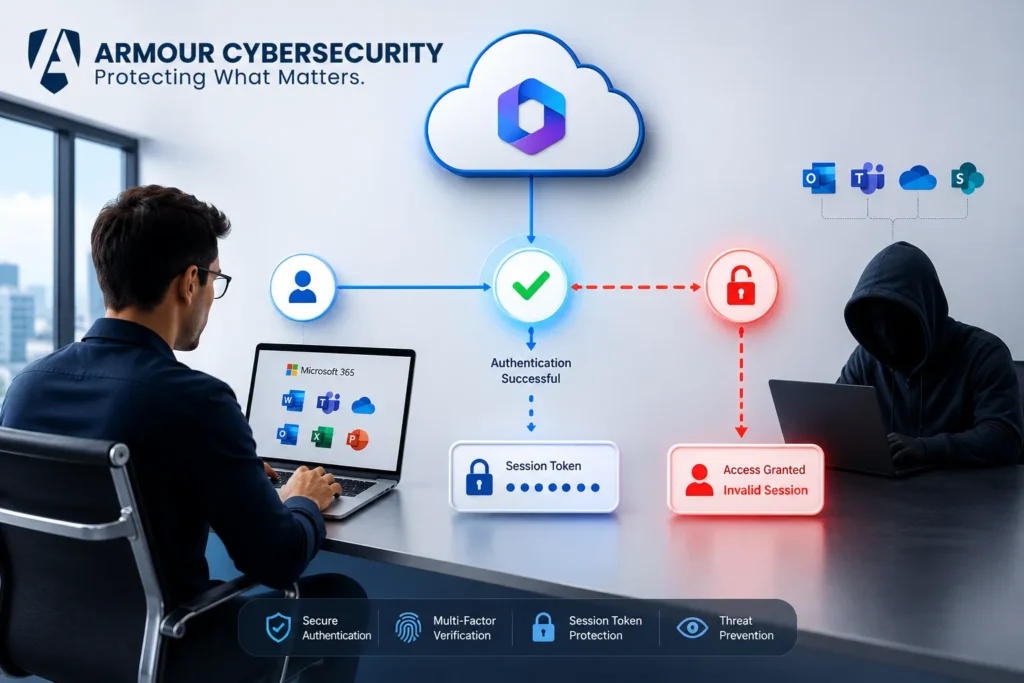
AiTM phishing operates at a different layer. Instead of stealing credentials, it steals authenticated sessions. Here is the attack sequence:
- The attacker sets up a reverse proxy, a server that sits between the victim and the legitimate Microsoft 365 authentication service, invisibly relaying all traffic.
- The victim receives a phishing email containing a link to what appears to be a legitimate Microsoft login page. The page looks identical to the real one because the proxy is rendering the real Microsoft authentication interface in real time.
- The victim enters their credentials and completes MFA through the proxy. From the victim’s perspective, everything looks normal, they are entering their credentials and completing their usual MFA challenge on what appears to be a real Microsoft page.
- At the moment Microsoft issues a session token confirming the completed authentication, the proxy intercepts that token before passing it to the victim’s browser.
- The attacker now possesses a valid, authenticated session token, proof that authentication has already been completed. They can use that token to access Microsoft 365 services, Outlook, Teams, OneDrive, SharePoint, without entering any credentials and without triggering any MFA challenges.
The attack bypasses MFA entirely because MFA protects the authentication step. The token represents authentication that has already happened. By the time the attacker uses the token, the MFA check is in the past.
Armour Cybersecurity’s M365 Security Optimization service hardens your Microsoft 365 environment against token theft, AiTM phishing, and configuration drift, with expert implementation of controls that actually work against 2026 attack techniques. Explore M365 Security Optimization →
The Kali365 platform and the commoditization of AiTM attacks
AiTM phishing is not new, security researchers have documented the technique for several years. What changed in 2026 is the accessibility of the tooling.
Kali365, first observed in April 2026 and the subject of an FBI Public Service Announcement on May 21, 2026, is a Phishing-as-a-Service platform distributed through Telegram channels. For a subscription fee as low as USD$250 for 30 days, it provides attackers with AI-generated phishing lures, automated campaign templates, real-time targeting dashboards, and OAuth token capture capabilities, all packaged for operators who lack the technical sophistication to build these tools themselves.
The FBI’s warning documented hundreds of attacks across manufacturing, education, government, insurance, financial services, and healthcare in April 2026 alone, all via Kali365. Security firms Arctic Wolf and Proofpoint corroborated the volume independently.
Kali365 did not emerge in isolation. Proofpoint documented a sharp increase in device code phishing beginning in September 2025, when state-aligned threat actors first adopted the technique at scale. By February 2026, tools like EvilTokens had fully commoditized the method. Huntress tracked more than 340 compromised organizations across five countries from a related campaign. Kali365 arrived as a more polished, feature-complete product in an already-established market.
The practical implication for Canadian IT teams is that AiTM capability is no longer the exclusive domain of sophisticated nation-state actors. Conducting a formal cybersecurity assessment helps organizations identify gaps that attackers commonly exploit through token theft and phishing campaigns. It is available as a subscription service to any attacker with CA$350 and a Telegram account.
How to detect if your organization has already been compromised
Token theft incidents are difficult to detect with standard monitoring because the attacker is operating with a legitimate, authenticated session. This is why many organizations invest in managed detection and response capabilities that continuously monitor identity-based threats and abnormal user behavior. The activity looks like a normal user session, until you examine the contextual signals carefully. Indicators of compromise to investigate immediately:
- Sign-ins from unfamiliar geographic locations or IP ranges within a short time window following a user’s normal sign-in, indicating the token is being replayed from attacker infrastructure
- Sign-ins from two locations that are geographically impossible within the time elapsed, a classic impossible travel indicator that signals token replay
- Unusual OAuth application consent grants, particularly applications that were authorized by users in a short window following a phishing campaign
- Unexpected mailbox rules or forwarding configurations created after a sign-in event, a common first action attackers take after gaining Outlook access
- Unusual access to SharePoint or OneDrive from unfamiliar user agents or IP addresses
- Sign-in activity in Microsoft Entra audit logs that does not correlate with the user’s normal working patterns or device registration
The Microsoft 365 Unified Audit Log is the primary data source for token theft investigation. KnowBe4 Threat Labs specifically recommends auditing recently consented OAuth applications and searching email logs for specific sender and subject patterns as immediate detection steps.
Armour Cybersecurity’s Managed Services provide 24/7 monitoring of your M365 environment, including identity anomaly detection, OAuth grant monitoring, and impossible travel alerting. Explore Managed Services →
Microsoft 365 Conditional Access policies that block AiTM attacks
The most direct technical mitigation for AiTM and device code phishing is Conditional Access policy configuration within Microsoft Entra ID. A comprehensive cyber risk assessment can help prioritize these controls based on business impact and current security maturity. These are the controls Canadian IT teams should implement or verify immediately:
Block the device code authentication flow
Device code phishing, the technique used by Kali365 and the Tycoon platform, abuses Microsoft’s OAuth 2.0 Device Authorization grant flow. This flow was designed for devices without browsers (smart TVs, printers, IoT devices). Most organizations have no legitimate business reason to allow it for user accounts. A Conditional Access policy blocking the device code flow eliminates this entire attack vector for accounts where it is enforced.
Enforce token binding through Continuous Access Evaluation (CAE)
Continuous Access Evaluation reduces the usefulness of stolen tokens by enforcing real-time re-evaluation of session validity. When a user’s risk level changes, an impossible travel event, a password reset, a revocation event, CAE can terminate active sessions immediately rather than waiting for the token to expire naturally. Coverage is not universal across all Microsoft 365 services and legacy protocols, so this control should be combined with others rather than relied on alone.
Require compliant or Hybrid Azure AD joined devices
Requiring that sign-ins originate from known, managed, and compliant devices substantially raises the cost of token replay attacks. An attacker who steals a session token from a managed device must also simulate a managed device to replay it, a significantly higher barrier than simply replaying the token from an unmanaged machine.
Implement sign-in risk policies
Microsoft Entra ID Protection provides risk-based Conditional Access policies that trigger additional authentication requirements or block sign-ins when contextual signals indicate elevated risk: impossible travel, anonymous IP addresses, unfamiliar locations, malware-linked IP addresses. These policies do not prevent initial token theft but significantly increase the difficulty of replaying stolen tokens.
Restrict OAuth application consent
Configure Microsoft Entra ID to require administrator approval for OAuth application consent requests, or to limit consent to verified publishers only. This prevents attacker-controlled applications from obtaining persistent access grants even when a user completes an authentication flow.
Phishing-resistant MFA: what it is and how to deploy it in M365
Standard MFA, push notifications, SMS codes, TOTP authenticator apps, does not protect against AiTM attacks because those second factors are completed through the proxy and the resulting token is stolen. Phishing-resistant MFA methods bind authentication to the specific site the user intends to authenticate to, making the credential unusable from an attacker’s proxy.
Two phishing-resistant MFA methods are available in Microsoft 365:
- FIDO2 security keys, hardware devices (YubiKey, Microsoft-compatible security keys) that bind authentication to the origin domain. If a user is directed to a phishing proxy rather than the real Microsoft login page, the FIDO2 key will not authenticate, it recognizes the domain mismatch. FIDO2 is the strongest available control against AiTM phishing.
- Windows Hello for Business, certificate-based authentication tied to a specific managed device. Authentication cannot be replayed from a different device or through a proxy because it requires the private key stored on the enrolled device.
Phishing-resistant MFA significantly reduces the risk of AiTM attacks but does not fully eliminate token replay risk once a session is established through other means. It should be deployed as part of a layered approach alongside Conditional Access policies, device compliance requirements, and CAE.
The 8 M365 security controls Canadian IT teams should implement immediately
| Control | Action Required |
| Block device code flow | Create a Conditional Access policy blocking the Device Code authentication flow for all user accounts without a documented business exception |
| Enable CAE | Verify Continuous Access Evaluation is enabled in Microsoft Entra ID for all supported workloads |
| Require compliant devices | Enforce device compliance requirements through Conditional Access for all sign-ins to M365 services |
| Deploy sign-in risk policies | Configure Entra ID Protection risk-based Conditional Access to require step-up authentication or block high-risk sign-ins |
| Audit OAuth grants | Review all active third-party application consent grants; revoke any unauthorized or unrecognized applications immediately |
| Enable Unified Audit Log | Verify the Unified Audit Log is enabled and retained for a minimum of 90 days for all user and administrator activity |
| Implement phishing-resistant MFA | Prioritize FIDO2 or Windows Hello for Business deployment for privileged accounts, finance, HR, and executive roles |
| Review mailbox forwarding rules | Audit all mailbox forwarding and redirect rules across your tenant; unauthorized rules are a primary indicator of AiTM compromise |
How to respond if you suspect an AiTM breach has occurred
If you suspect a token theft compromise has occurred in your M365 environment, effective incident response planning becomes critical to reducing containment time and limiting business disruption. Act in this sequence:
- Revoke all active sessions for the suspected compromised account immediately using Microsoft Entra ID’s ‘Revoke all sessions’ capability. This invalidates all existing tokens and forces re-authentication.
- Reset the account’s credentials even though credentials were not directly stolen, the compromise may have provided the attacker with enough context to request a password reset or conduct social engineering against your help desk.
- Audit the Unified Audit Log for all activity by the compromised account in the period following the suspected token theft: email access, file downloads, SharePoint activity, external forwarding rule creation, OAuth consent grants, and administrative actions if the account holds elevated privileges.
- Review all OAuth applications consented to by the compromised account and revoke any that were not pre-authorized by IT.
- Check for mailbox rules, particularly forwarding rules or rules that move specific emails to obscure folders, that may have been created to persist attacker access to email content.
- If the compromised account holds administrative privileges, conduct a full administrative audit: new accounts created, permission changes, conditional access modifications, and MFA method changes.
- Notify your legal counsel. Token theft incidents involving access to personal information may trigger PIPEDA notification obligations if there is a real risk of significant harm.
- Engage your incident response team or retainer. AiTM compromise investigations require forensic log analysis that goes beyond what standard IT teams typically have capacity to execute under pressure.
If you suspect an active M365 compromise, Armour Cybersecurity’s Breach Response team is available 24/7 — with forensic capability and M365 expertise to contain, investigate, and remediate. Contact Breach Response →
Frequently asked questions
Does Microsoft Authenticator protect against AiTM phishing?
Standard Microsoft Authenticator, number matching, push notifications, and TOTP codes, does not protect against AiTM phishing. These second factors are completed through the attacker’s proxy and the resulting session token is stolen regardless of whether the user completed MFA successfully. Microsoft Authenticator with passkey support (currently in preview) provides phishing-resistant authentication and does protect against AiTM. FIDO2 security keys and Windows Hello for Business are the currently available phishing-resistant options for standard M365 deployments.
What is a session token and how do attackers steal it?
A session token is a credential issued by Microsoft after a user successfully authenticates, it confirms that authentication has been completed and grants access to M365 services without requiring repeated credential entry. In AiTM attacks, the attacker’s proxy intercepts this token at the moment Microsoft issues it, before it reaches the user’s browser. The attacker can then replay that token from their own infrastructure to access the victim’s M365 account, Outlook, Teams, OneDrive, SharePoint, without entering credentials or completing MFA, because the token already represents completed authentication.
What is the difference between Kali365 and Tycoon phishing?
Both are Phishing-as-a-Service platforms that deliver AiTM attacks against Microsoft 365, but they use different technical approaches. Tycoon and its successors primarily use reverse proxy infrastructure to intercept session cookies in real time during authentication. Kali365, first observed in April 2026, specifically abuses the OAuth 2.0 Device Authorization grant flow, tricking users into entering an attacker-supplied device code at the legitimate Microsoft device login portal, after which Microsoft issues a token directly to the attacker’s registered application. Both defeat standard MFA; both are addressed by blocking the device code flow and implementing phishing-resistant authentication.
What M365 logs should I review to detect AiTM activity?
The Microsoft 365 Unified Audit Log is the primary source. Specifically: sign-in logs in Microsoft Entra ID for impossible travel events, unfamiliar IP addresses, and unfamiliar user agents; OAuth application consent grants for any applications authorized during a suspected attack window; Exchange mailbox audit logs for forwarding rule creation, unusual email access patterns, and send-as or send-on-behalf activity; SharePoint and OneDrive audit logs for unusual file access or download activity. Ensure the Unified Audit Log is enabled and that your retention period is sufficient to cover the suspected dwell period, Microsoft’s default retention for standard licenses is 90 days.
AiTM phishing is not a theoretical future threat, it is an active, commoditized attack capability that hit 35,000 users across 13,000 organizations in three days in April 2026. Organizations concerned about their preparedness should consider a breach readiness assessment to validate response capabilities before an attack occurs. The organizations that contain it are the ones that moved beyond MFA-as-a-complete-control and implemented the layered identity architecture that the current threat environment demands. The ones that have not are operating with a gap that a CA$350 Telegram subscription can exploit.
Armour Cybersecurity’s M365 Security Optimization service implements the Conditional Access policies, phishing-resistant MFA configurations, and monitoring controls that protect Canadian organizations against AiTM phishing, token theft, and device code attacks — with expert deployment and ongoing management.