By David Chernitzky, CEO, Armour Cybersecurity · Serving Toronto and organizations across North America · Last updated August 21, 2026
Quick Answer
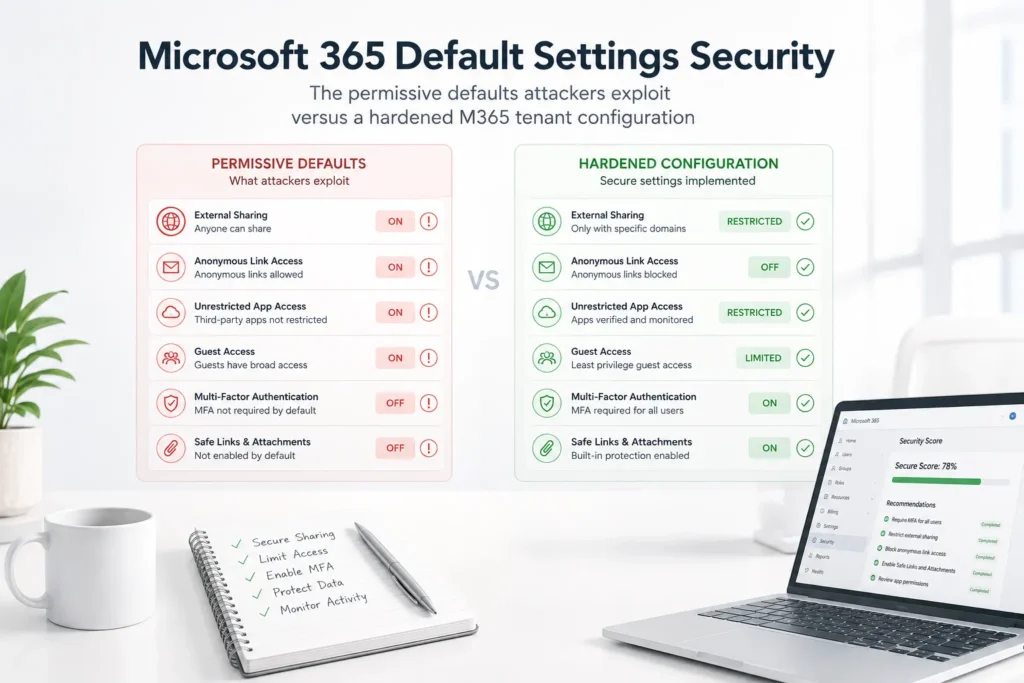
Microsoft 365 is designed so that a new tenant is productive within hours. That design goal and the goal of being secure by default are in direct tension, and Microsoft resolves that tension in favor of productivity. The defaults that ship with a new M365 tenant allow external sharing of SharePoint and OneDrive content with anyone who has a link, permit auto-forwarding of mailbox contents to external addresses, leave audit logging inconsistently configured across license tiers, allow users to grant OAuth applications broad permissions without administrator approval, and do not enforce multi-factor authentication unless an administrator explicitly configures it. Each of these defaults is a configuration the customer owns under the cloud shared responsibility model, and each represents an attack surface that adversaries have documented playbooks for exploiting. An M365 hardening engagement starts by measuring where the tenant sits against a security baseline and then systematically closes each gap, working across Exchange, SharePoint, OneDrive, Teams, identity, data loss prevention, monitoring, and admin governance until the configuration reflects a defensible posture rather than a convenient one.
Key Takeaways
- Microsoft 365 is the most attacked cloud platform in enterprise and mid-market environments. Its near-universal adoption means attackers have invested heavily in understanding its configuration gaps and building attack tooling specifically for M365 environments. Phishing campaigns targeting M365 credentials, business email compromise attacks exploiting weak mail flow controls, and OAuth consent phishing that tricks users into granting malicious applications access to their mailbox are all attack types specifically enabled by M365 default settings and significantly reduced by a hardened configuration.
- MFA is not enforced by default for most M365 tenants. Security Defaults, introduced by Microsoft to push basic security hygiene to smaller tenants, enable MFA in a limited form for new tenants created after a certain date, but the coverage is not consistent across all license tiers and tenant configurations. Many existing tenants, and many new tenants whose administrators disabled Security Defaults to gain more control over conditional access, are operating with MFA not enforced for some or all users. A single compromised credential without MFA is sufficient for an attacker to own the corresponding mailbox, access all SharePoint and OneDrive content the user can reach, and use the account as a foothold for further compromise.
- External sharing in SharePoint and OneDrive defaults to permissive settings that allow content to be shared with anyone, including people outside the organization, without authentication. A document shared using the default sharing settings produces a link that anyone in possession of it can use to access the document, with no login required. For organizations that handle sensitive client data, financial information, or regulated personal data, this default creates compliance exposure and data leakage risk that exists purely because no one changed the setting from what Microsoft shipped.
- Auto-forwarding rules are a post-compromise persistence mechanism that attackers configure immediately after gaining access to a mailbox. A forwarding rule that sends copies of all incoming email to an external address allows the attacker to monitor the compromised mailbox passively, collecting information about financial transactions, client relationships, and internal communications without needing to maintain active access. M365 does not block auto-forwarding to external addresses in every default configuration. A mail flow rule that blocks outbound auto-forwarding to external domains by default, with exceptions requiring explicit administrator approval, closes this gap.
- Admin accounts that use the same identity as the administrator’s daily-use account create an unnecessarily large blast radius from a credential compromise. An administrator whose daily-use account is also a Global Administrator can have that account compromised through a phishing attack during their normal workday, which hands the attacker Global Administrator access to the entire M365 tenant. Dedicated admin accounts, separated from daily-use identities, used only for administrative tasks, and protected by stronger authentication requirements, limit the blast radius of a credential compromise to the scope of what the daily-use account can reach.
The Gaps Attackers Rely On Most
Credential compromise through missing MFA
Password-based authentication without a second factor is the most reliably exploitable gap in any M365 environment. Credential databases from prior breaches at other services contain billions of username and password combinations. Attackers run these databases against M365 login endpoints in automated attacks called credential stuffing: trying each credential pair against the target organization’s tenant to find accounts where the password matches. Because people reuse passwords across services, credential stuffing against M365 succeeds at a meaningful rate even when the organization has never been breached itself.
MFA enforcement prevents credential stuffing from succeeding even when the password is correct: the attacker has the password but not the second factor, so the authentication attempt fails. Conditional access policies that enforce MFA at login, rather than relying on per-user MFA settings that administrators enable inconsistently, are the reliable implementation, and their design and rollout is a core part of identity and access management hardening. Conditional access also allows stronger MFA requirements for higher-risk scenarios, requiring hardware security key authentication for admin accounts while accepting authenticator app verification for standard users, and blocking authentication entirely from locations or device types that are never legitimate for the organization.
OAuth consent phishing
OAuth consent phishing is an attack that exploits the M365 feature that allows users to grant third-party applications access to their account data. The attacker creates a malicious application registered in Microsoft Entra ID and sends users a phishing link that initiates an OAuth consent flow. The user sees a legitimate-looking permission request asking for access to their email, contacts, or files. If the user clicks Accept, the malicious application receives an OAuth token that grants it persistent access to the user’s account, with no password required and without triggering MFA, because the user authenticated legitimately to grant the consent.
The remediation is an administrator policy that restricts which applications users can consent to grant access. A policy that allows user consent only for applications from verified publishers, or that requires administrator approval for all third-party application consent, prevents the OAuth consent phishing attack regardless of whether users click the link. This policy is not configured by default; it requires an administrator to navigate to the Entra ID enterprise application consent settings and change the default from allow user consent to require admin approval.
External sharing and data leakage
SharePoint and OneDrive external sharing settings exist at both the tenant level and the site level. The tenant-level default allows sharing with anyone using a link that requires no authentication. Site-level settings can be more restrictive than the tenant default but cannot be more permissive. In practice, most M365 tenants have never been reviewed for external sharing configuration, and the tenant-level default has been in place since the tenant was created. Users who share documents using the default share link are creating unauthenticated, publicly accessible links to organizational content without understanding that this is what they are doing.
Hardening the external sharing configuration restricts the tenant-level default to authenticated external users only, or to specific external domains that the organization has business relationships with, and requires that more permissive sharing needs explicit administrator exception. The result is that sharing outside the organization requires a deliberate action rather than happening by default, and the content shared is accessible only to the specific authenticated recipient rather than to anyone who obtains the link. For organizations with compliance obligations covering the data they store in SharePoint and OneDrive, this configuration change is a prerequisite for meeting those obligations.
What M365 Hardening Actually Covers
Nine domains, one integrated program
Effective M365 hardening is not a single setting change; it is a structured program that addresses each surface of the M365 environment where attackers have documented attack techniques. Armour Cybersecurity’s methodology covers nine domains, Exchange, Teams, SharePoint, OneDrive, identity, data loss prevention, monitoring, governance, and training, aligned to Microsoft Security Benchmarks, the CIS Microsoft 365 Foundations Benchmark, NIST CSF, ISO 27001, and SOC 2, so a single hardening engagement produces evidence that satisfies multiple compliance obligations. Exchange Online hardening covers the email security controls: advanced threat protection for email (Safe Attachments, Safe Links, anti-phishing), mail flow rules that block auto-forwarding and enforce routing controls, and the email authentication configuration of DKIM, SPF, and DMARC that prevents the organization’s domain from being spoofed in phishing attacks against its customers and partners. SharePoint and OneDrive hardening covers external sharing settings, data loss prevention policies, sensitivity labels, and guest access controls. Teams hardening covers guest access, meeting security, messaging retention, and the governance policies that prevent Teams sprawl from creating ungoverned collaboration spaces.
Identity hardening covers MFA enforcement, conditional access policy design and implementation, sign-in risk policies, and the separation of admin accounts from daily-use identities. Data loss prevention covers the policies that detect and block sensitive data from leaving the tenant through email, SharePoint sharing, Teams messages, or OneDrive sync. Audit logging and managed monitoring covers the configuration that ensures every significant security event in the tenant is captured, retained, and surfaced through alerts. Admin governance covers the role assignments, privileged access controls, and admin activity auditing that limit the blast radius of a compromised administrative account. And user training closes the loop on the human element that the technical controls cannot fully address.
Baseline-to-baseline measurement
Microsoft Secure Score is a measurement tool built into the Microsoft Defender portal that scores the tenant’s security configuration against a set of recommended actions. Each recommended action has a point value; implementing the action adds those points to the tenant’s score. The score is useful as a relative measure of improvement and as a compliance documentation artifact, but it does not capture every security-relevant configuration in the tenant. Some high-impact configurations do not appear in the Secure Score recommendations; some Secure Score recommendations are low-impact for a specific organization’s risk profile. Armour Cybersecurity uses Secure Score as a before-and-after measurement tool while conducting a comprehensive manual assessment of the tenant configuration that goes beyond what Secure Score captures. The post-hardening report documents both the Secure Score improvement and the specific controls applied across all nine M365 domains, delivered through the M365 Security Optimization engagement.
Across the 260+ organizations Armour Cybersecurity protects in 52+ industries, the M365 tenants that get compromised are rarely running exotic misconfigurations. They are running the settings Microsoft shipped, unchanged, because the tenant was stood up for productivity and no one ever came back to close the defaults that productivity left open.
Frequently Asked Questions
Will hardening M365 disrupt our users?
Properly designed hardening does not disrupt legitimate business workflows. The most user-visible changes are MFA enforcement, which changes the login experience for all users, and external sharing restrictions, which change how documents are shared outside the organization. Both of these changes affect daily habits. Effective implementation includes user communication before the changes go live, training that explains what is changing and why, and a rollout sequence that allows time for users to adapt before the next set of changes is implemented. Conditional access policies are designed around the organization’s actual workflows, so the controls catch anomalous behavior without blocking legitimate access patterns. The distinction between a hardening engagement that causes significant disruption and one that does not is the quality of the design and the care taken in the implementation sequence.
What licenses do we need for full M365 hardening?
Many of the most impactful security controls are available at the Microsoft 365 Business Premium license level, which includes Microsoft Defender for Business, Entra ID P1 for conditional access, and Defender for Office 365 Plan 1 for advanced threat protection. Organizations on lower license tiers, such as Microsoft 365 Business Standard, can implement some hardening controls using the capabilities available in their license but cannot access conditional access policies, advanced identity protection features, or Defender for Office 365 without upgrading. An M365 security assessment includes a license utilization review that identifies which security capabilities the organization is licensed for, which it is using, and where a license upgrade would unlock meaningful security controls that cannot be achieved without it. Many organizations discover they are licensed for capabilities they have never configured.
How long does an M365 hardening engagement take?
Most full-tenant hardening engagements complete within six to eight weeks. The current-state assessment takes one to two weeks and produces the gap analysis that drives the implementation sequence. Design of the conditional access policies, DLP rules, and other tenant-specific configurations takes one to two weeks and requires input from the organization’s IT and business stakeholders to ensure the controls are aligned to actual workflows. Implementation across Exchange, SharePoint, OneDrive, Teams, identity, and monitoring takes two to three weeks, typically phased to allow user communication and adaptation between the most visible changes. The final week covers the post-hardening Secure Score capture, control validation, and delivery of the documentation package.
Can M365 hardening be done without any downtime?
Yes. M365 hardening does not require platform downtime. Configuration changes to Exchange, SharePoint, Teams, and Entra ID take effect incrementally and can be implemented during business hours without interrupting service. The changes that are most likely to affect users, MFA enrollment and conditional access policy activation, are typically rolled out in phases: the policy is deployed in report-only mode first, which logs what would have happened without blocking access, allowing the response team to review the policy’s impact on actual traffic before switching to enforcement mode. This phased approach eliminates the risk of a policy blocking legitimate business traffic unexpectedly when it goes live.
The Bottom Line
Microsoft 365 did not ship insecure by accident; it shipped configured for adoption, and the settings that make a new tenant productive in an afternoon are the same ones attackers count on being left untouched. Missing MFA, open external sharing, unrestricted OAuth consent, external auto-forwarding, and shared admin identities are not obscure edge cases, they are the default state of most tenants that no one has revisited. Hardening is the deliberate work of closing each of those defaults across every M365 domain and then measuring the result, so the tenant reflects a defensible posture rather than a convenient one. Armour Cybersecurity’s M365 Security Optimization takes a tenant from default configuration to a hardened, monitored, audit-ready state, with a Secure Score baseline before and after to prove the improvement, so the platform you already pay for actually protects the data you put in it.
About the author
David Chernitzky is the CEO and Co-Founder of Armour Cybersecurity, a Toronto-based firm that protects organizations across North America from advanced cyber threats. He brings more than 25 years of cybersecurity and military cyber intelligence experience, having served as an officer in an elite technology unit before co-founding Armour. Armour’s team of military-intelligence veterans and senior advisors serves 260+ clients across 52+ industries with a 97% client retention rate. Learn more about Armour Cybersecurity.