Why 60 years of password policy failed — and what finally got it right.
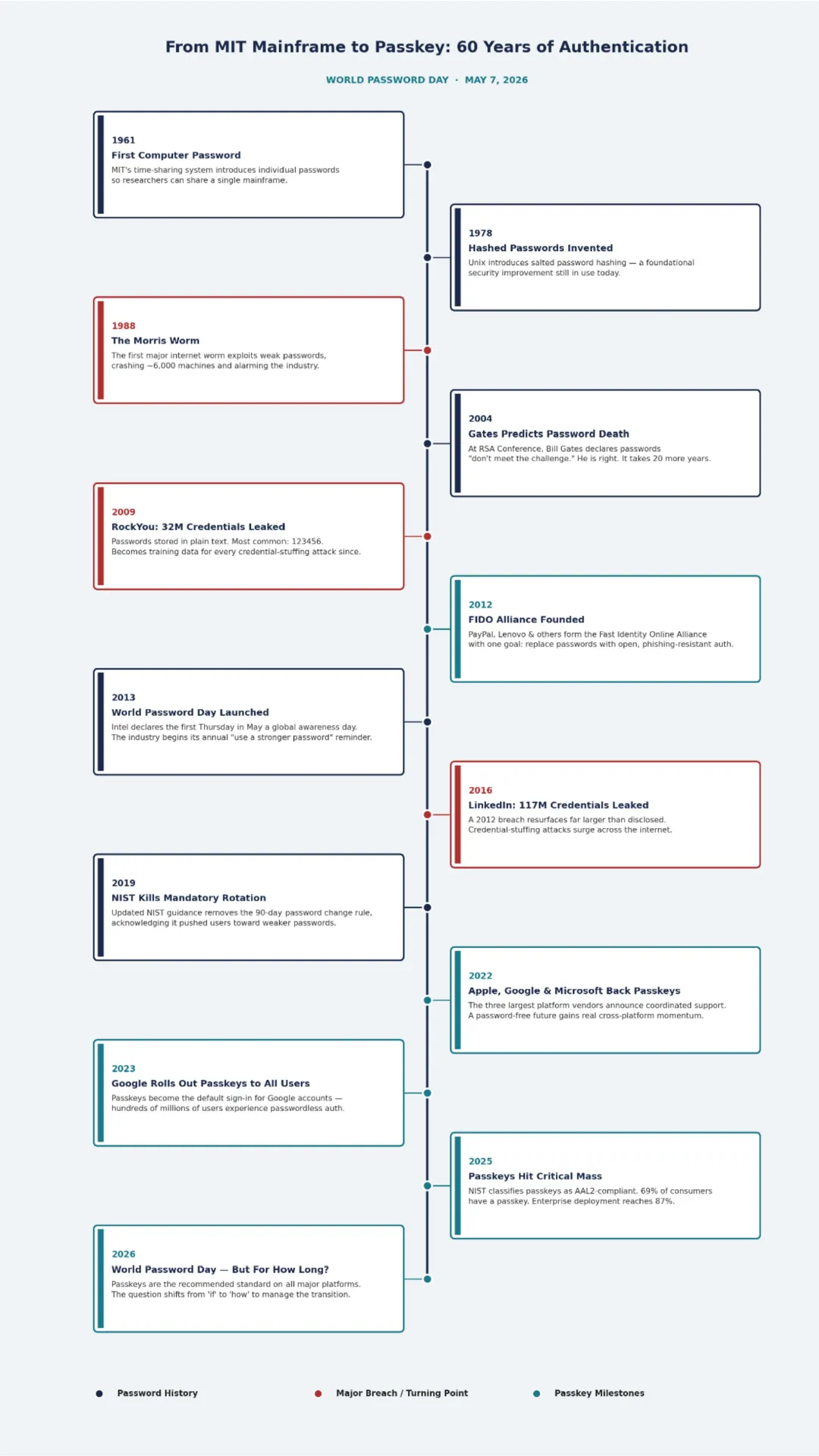
Every year on World Password Day, the cybersecurity industry publishes roughly the same article. Use a longer password. Enable multi-factor authentication. Stop using your dog’s name. These are good pieces of advice, and they have been good pieces of advice since 2013, when Intel first declared the first Thursday in May a global awareness moment.
And yet here we are, thirteen years later, still having the same conversation.
This article argues that this is not a coincidence. We kept having the same conversation because we kept asking the wrong question. The question was never “how do we make better passwords?” The question was always “why do humans keep creating bad ones?” And until we were honest about the answer, no amount of awareness campaigns was going to move the needle.
The good news is that an answer has finally arrived, and it is called a passkey.
Passwords Were Designed for Computers, Not for People
The modern computer password was born at MIT in 1961, when the Compatible Time-Sharing System allowed multiple researchers to log into a single mainframe. Each user was assigned a unique password to ensure private access to their own files. The engineers who designed it were thinking about access control, not usability. The password was a logical key for a logical system, and it worked perfectly, for a world in which each person had exactly one account on exactly one machine.
That world no longer exists.
Today, according to Dashlane’s research, the average person manages approximately 301 passwords. That is 301 unique secrets that a human brain is expected to generate, store, recall, and periodically rotate without writing any of them down, without reusing them across accounts, and without making any of them guessable. What began as a single logical key has become a cognitive impossibility.
This is not a failure of human behaviour. It is a failure of system design. When any system places demands that are structurally impossible for its users to meet, the users will find workarounds. Password reuse, predictable patterns, incremental variations (Password1, Password2, Password3), and sticky notes on monitors are not signs of carelessness. They are entirely rational responses to an irrational burden.
| Key Insight When a system’s security requirements exceed what human cognition can sustainably support, users will not rise to the system’s demands. The system will fall to the users’ limits. Every time. |
The Policy Paradox: How Complexity Rules Made Things Worse
For decades, the response to weak passwords was to mandate stronger ones. Organisations enforced complexity rules: minimum eight characters, at least one uppercase letter, one number, one symbol. They added rotation policies: change your password every 90 days. They added lockout policies, history requirements, and pattern restrictions
None of it worked. In fact, much of it made things measurably worse.
Research conducted over several years and formally acknowledged by NIST in its updated guidance, found that mandatory rotation policies consistently push users toward weaker, more predictable passwords. When forced to change a password every 90 days, users do not generate an entirely new random string. They increment: Summer2024! becomes Fall2024! becomes Winter2025! Attackers know this. So do the credential-stuffing tools they use.
Complexity rules produced a similar effect. When a user cannot write fluffy as a password, they write Flu@@y1! – a password that satisfies every technical requirement and is still trivially guessable to anyone who knows their pet’s name from LinkedIn.
The 90-day rotation policy has since been removed from NIST’s recommendations. The lesson took years to absorb, but it is now well-established in the research: policies that ignore human behaviour tend to produce security theatre rather than actual security.
| The Policy Trap Security rules that are technically rational but humanly unsustainable don’t get followed. They get worked around. And workarounds create vulnerabilities that no policy audit will ever catch. |
The Human Cost Nobody Talks About
Most World Password Day articles focus on the organisational cost of weak passwords: breach statistics, ransomware payouts, recovery timelines. These numbers are real and they matter. But there is another cost that rarely appears in the data, and it shapes employee behaviour in every organisation that has ever run a security awareness programme.
It is the psychological cost of password fatigue.
Password fatigue is not just inconvenience. It is a low-grade chronic stressor that affects how employees make decisions throughout their workday. A person who has been locked out of their VPN at 8:47 AM, waited on hold with the helpdesk, reset their credentials, and finally reached their inbox at 9:20 AM is not in the optimal mental state to scrutinise a suspicious email that arrives at 9:25 AM.
Password friction creates decision fatigue. Decision fatigue reduces vigilance. Reduced vigilance is the precondition for phishing success. The security mechanism designed to protect the organisation was quietly undermining its own defence layer.
There is also the shame dimension. In security awareness training, one of the most persistent barriers to behaviour change is the culture of blame that surrounds password failures. When employees feel that clicking a phishing link or reusing a password marks them as personally irresponsible rather than as the victim of a system that asked too much of them, they stop reporting incidents. And incidents that go unreported are incidents that escalate unchecked.
Human-centred security design starts by acknowledging that shame is not a training strategy. It is an obstacle to one.
What Passkeys Got Right: Working With Human Nature
A passkey is a cryptographic credential that replaces a traditional password. When you set up a passkey for a website or application, your device generates a unique pair of cryptographic keys: a private key that never leaves your device, and a public key that is registered with the service. When you log in, your device uses biometrics (face or fingerprint) or your device PIN to confirm your identity and sign an authentication challenge with the private key. The server verifies the signature with the public key, and you are in.
No password to remember. No password to phish. No password to breach.
What makes passkeys significant is not just the technical mechanism. It is that they are the first mainstream authentication method designed around how people actually behave, rather than how we wish they would.
They leverage existing behaviour
Unlocking a phone with a fingerprint or face is something hundreds of millions of people do dozens of times a day without thinking about it. Passkeys extend that exact behaviour to every authentication touchpoint. There is no new skill to learn, no new habit to form. The friction has not been reduced it has been eliminated.
They make phishing structurally impossible
A traditional password can be entered into a fake login page. A passkey cannot. The private key is cryptographically bound to the specific domain it was registered with. A convincing replica of a banking login page cannot trigger a legitimate passkey authentication, regardless of how realistic it looks. This is not a user behaviour problem that training needs to compensate for. It is a technical guarantee.
They are not a secret the user can accidentally share
Most social engineering attacks depend on one central vulnerability: the user knows the password. A passkey is a cryptographic credential that the user does not know and cannot share even under pressure, even inadvertently, even in response to a convincing pretexting call from someone claiming to be IT support.
| How Passkeys Work — At a Glance Your device generates a private/public key pair when you register. The private key stays on your device. The website stores only the public key. At login, your device uses biometrics or PIN to sign a challenge with the private key. The server verifies the signature. No password is ever transmitted or stored. Nothing to phish. Nothing to breach. Nothing to forget. |
Where the Numbers Stand in 2026
Passkeys have moved from concept to mainstream standard faster than most technologies in the authentication space. The data from 2025 and early 2026 reflects an industry at a genuine inflection point.
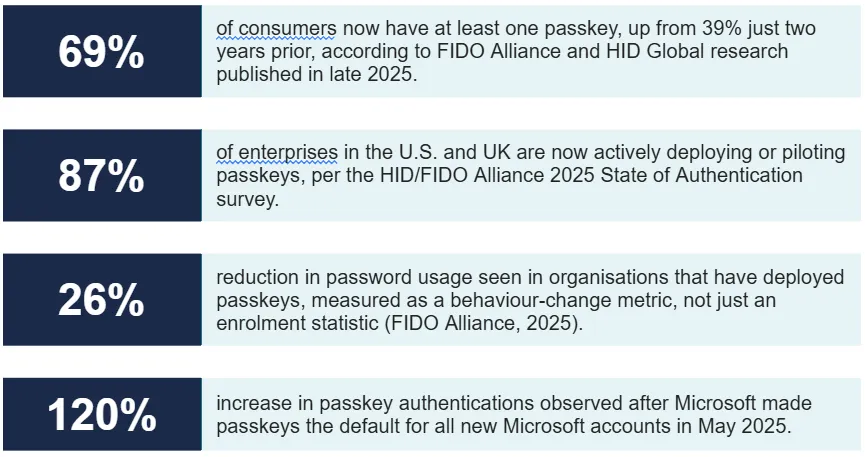
On the regulatory side, NIST’s SP 800-63-4, finalised in July 2025, formally classified synced passkeys as Authenticator Assurance Level 2 (AAL2)-compliant, the baseline required for most regulated enterprise scenarios, including financial services and federal contractors. For years, compliance uncertainty slowed enterprise adoption. That uncertainty is now resolved.
The broader picture, per industry data from Dashlane and the FIDO Alliance, is that passkey authentications overall more than doubled year-over-year, reaching 1.3 million per month by late 2025. The technology has passed the early-adopter phase. It is in the mainstream acceleration phase
The Transition Period Is Still a Human Risk Problem
Will World Password Day eventually be cancelled? It’s a fair question. If passkeys make passwords obsolete, does a day dedicated to password awareness have a future? The honest answer is: not yet and the reason why tells us something important about where the real risk still lives.
Passwords will coexist with passkeys for years to come. Legacy systems, smaller organisations, and less technically sophisticated users will take time to make the transition. During that coexistence period, the human risk dimension does not disappear, it shifts. And a shifted risk that nobody is watching is more dangerous than a familiar one that everyone knows to look for.
So no, World Password Day should not be cancelled but its agenda needs updating. Here is what organisations should be watching during the transition:
Shadow password persistence
Users who set up a passkey but still have a password on the same account retain a password-based attack surface. Organisations that deploy passkeys without a clear plan to deprecate the password fallback are not fully eliminating the risk, they are adding a better option alongside the old vulnerable one.
Enrolment design matters more than technology
Data from eBay’s passkey deployment, the most-cited real-world case study in the FIDO Alliance’s 2025 showcase found that when users were prompted to enrol in passkeys immediately after a successful login (a contextual, low-friction moment), adoption was 102% higher than when enrolment was available only through the settings menu. The technology did not change. The human experience of the technology did. Enrolment design is a UX problem, not an IT problem.
Recovery flows are the new attack surface
If a passkey is lost because a device is lost, wiped, or broken, the user needs a recovery path. That recovery path is now the most likely point of social engineering attack. Organisations must design recovery flows that are genuinely resistant to pretexting calls, not just technically compliant.
Not all platforms support passkeys yet
As of early 2026, approximately 50–60% of the top 100 websites support passkey authentication. That is significant progress. It also means a substantial portion of daily digital life still requires a password. For those accounts, the best available tools remain password managers and phishing-resistant MFA.
What This Means for Security Awareness Training
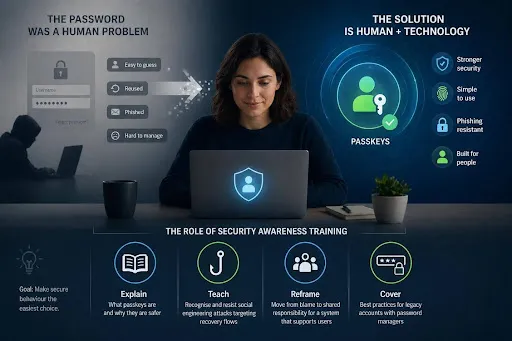
If the password was a human problem, not a technology problem, then the solution cannot be technology alone. Passkeys do most of the heavy lifting on the technical side, but the transition period requires human behaviour change and that is where security awareness training has its most meaningful role to play in 2026.
Training that still leads with password hygiene advice “make them longer, make them complex, change them often” is solving for a world that is actively being deprecated. The most effective programmes in 2026 are doing four things:
- Explaining what passkeys are and why they are safer, in plain language that does not require a cryptography background.
- Teaching employees to recognise and resist social engineering attacks that target recovery flows the new phishing frontier.
- Reframing the human risk conversation away from blame and toward shared responsibility for a system that, for the first time, is actually designed to support them.
- Covering password best practices for legacy accounts where passkeys are not yet available, using password managers as the bridging tool.
The goal of security awareness is not to turn every employee into a security expert. It is to design an environment in which secure behaviour is the path of least resistance. Passkeys are the first authentication technology that makes that goal structurally achievable.
Frequently Asked Questions
Q. Are passkeys actually more secure than a strong password + MFA?
Yes, in most threat models. Passkeys are phishing-resistant by design the credential is cryptographically bound to the legitimate domain and cannot be captured on a fake login page. Strong passwords with MFA can still be bypassed via adversary-in-the-middle attacks, SIM swapping, or push fatigue attacks. Passkeys eliminate the shared-secret model entirely.
Q. What happens if I lose the device my passkey is stored on?
Most major platforms (Apple, Google, Microsoft) sync passkeys across your devices via their respective credential managers. If you lose a single device, your passkeys are typically still available on your other synced devices. Organisations should establish clear recovery procedures for employees with no secondary device.
Q. Can passkeys be phished?
No. The private key never leaves your device and is cryptographically bound to the registered domain. A fake login page cannot trigger a legitimate passkey authentication. This is the most significant security advantage passkeys have over any form of password-based authentication, including password + MFA.
Q. Do passkeys work across different operating systems and browsers?
Yes, with increasing reliability. The FIDO Alliance’s Credential Exchange Protocol (CXP), now in active deployment, defines a standardised format for transferring passkey credentials between providers, addressing the interoperability gaps that previously slowed enterprise adoption.
Q. Should we still run password hygiene training?
Yes, during the transition period. A significant portion of daily digital life still relies on passwords, and employees need guidance on password managers and phishing awareness for legacy accounts. However, training programmes should be updated to reflect the passkey transition and avoid reinforcing outdated habits.
Q. What is the best first step for an organisation starting with passkeys?
Audit your most-used platforms and applications for passkey support. Enable passkeys as the default (not just an option) on supported platforms, and invest in enrolment UX — contextual prompts at login significantly outperform buried settings-menu options. Pair the rollout with clear employee communication
The Password Isn’t Dead. But the Era of Asking Humans to Carry It Alone Is.
World Password Day began as a reminder to take security seriously. After thirteen years, the most important reminder for 2026 is a different one: the system is finally starting to meet the human halfway.
Passkeys will not solve every authentication problem overnight. Legacy systems will persist. Transition periods create new attack surfaces. Human risk does not disappear, it evolves. But for the first time since that MIT mainframe in 1961, there is an authentication standard in mainstream deployment that was designed around how people actually behave rather than how we wished they would.
That is worth acknowledging on World Password Day 2026. Not just as a technology milestone, but as a human one.