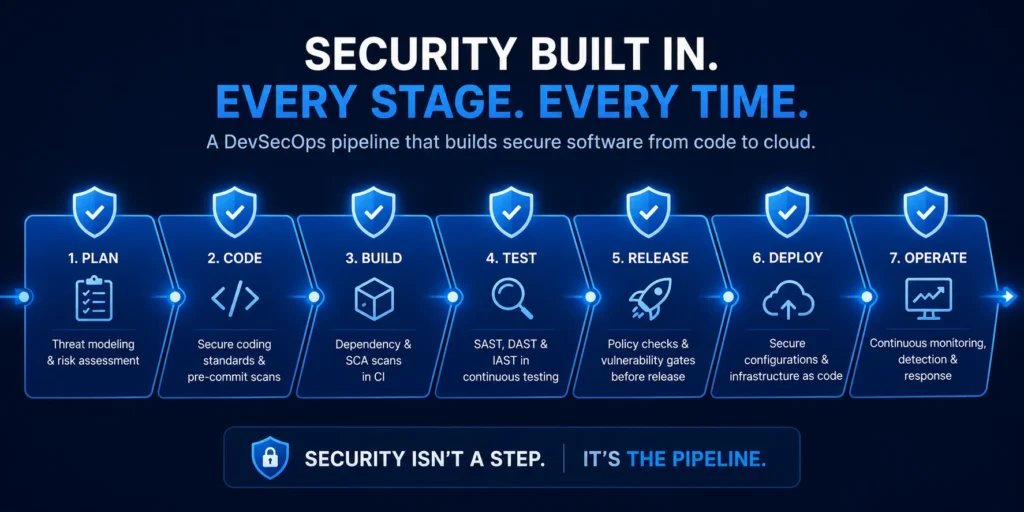
Quick answer: DevSecOps is the practice of building security into every stage of software development instead of adding it at the end. It extends DevOps, which unites development and operations for speed, by making security a shared, automated part of the pipeline rather than a final gate. The result is software that ships fast and secure, because vulnerabilities are caught when they are cheap to fix, not after release.
Key Takeaways
- DevSecOps = DevOps + security built in. Security becomes everyone’s job and part of the pipeline, not a last-minute checkpoint.
- “Shift left” is the core idea: catch security issues early in development, where they cost a fraction of what they cost after release.
- Fixing a vulnerability in production can cost many times more than fixing it in code, in both money and downtime.
- The building blocks are automation, infrastructure-as-code scanning, secrets management, and continuous testing.
- You do not need a big team to start. Begin with automated scanning in your existing pipeline and grow from there.
Why Bolt-On Security Fails
For years, security was the last stop before software shipped: build the product, then hand it to a security team for a review that often arrived too late to change anything. In a world where teams deploy weekly or daily, that model breaks. Security becomes a bottleneck, gets skipped under deadline pressure, or catches serious problems only after they are already live and expensive to unwind.
DevSecOps fixes the sequencing. Instead of a gate at the end, security becomes a thread running through the whole process, automated where possible and owned by everyone, not just a separate team. The same instinct that drives a periodic penetration test (find the weakness before an attacker does) is applied continuously, at the speed the business ships.
Shift Left: The Core Idea
“Shifting left” means moving security earlier in the timeline, to the left on a project plan. A flaw caught while a developer is still writing the code is a quick edit. The same flaw caught after release is an incident: emergency patching, downtime, and potentially a breach. Building security in early is simply cheaper, and a vulnerability management programme keeps that discipline going after code is live.
The Core Practices
- Automated security testing. Scanning code and dependencies for known vulnerabilities automatically, on every change, so nothing ships unchecked.
- Infrastructure as code scanning. When your servers and cloud are defined in code, that code can be scanned for misconfigurations before anything is deployed, closing the same gaps that undermine cloud security.
- Secrets management. Keeping passwords, API keys, and tokens out of code and in a secure vault, tied to strong identity and access controls.
- Continuous monitoring. Watching the running application for threats, so issues that slip through are caught quickly by managed SOC monitoring.
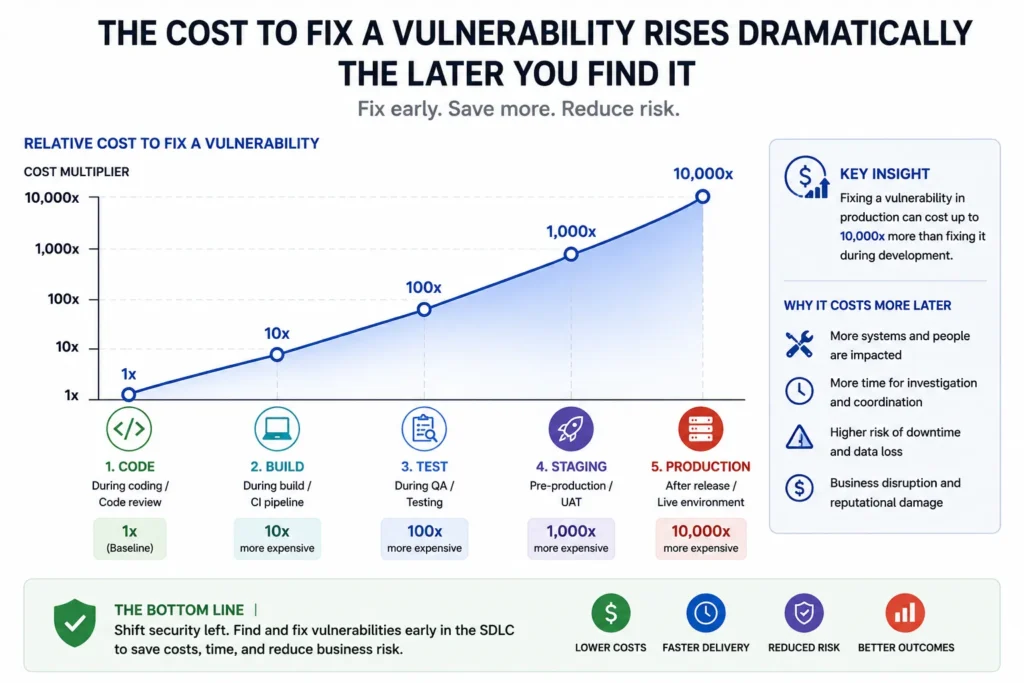
In our work across 260+ organizations in 52+ industries, the teams that build security into the pipeline from the first commit consistently spend far less fixing vulnerabilities than those that bolt security on right before release.
How to Start Without a Big Team
DevSecOps sounds like an enterprise programme, but the entry point is small. Add automated dependency and code scanning to the pipeline you already have. Move your secrets out of code. Pick one recurring class of bug and automate the check for it. Each step reduces risk without slowing releases, and the practice compounds. For teams without in-house security expertise, Armour’s DevSecOps services provide the tooling and guidance to build this in without hiring a full security team.
The Bottom Line
DevSecOps is not a tool you buy, it is a shift in when and how security happens: early, automated, and shared. Businesses that adopt it ship software that is both faster and safer, because the two stop being a trade-off. If your development is outpacing your security, building it into the pipeline is how you close the gap without slowing down.
Frequently Asked Questions
What is the difference between DevOps and DevSecOps?
A: DevOps unites development and operations to ship software faster. DevSecOps adds security as a third, equal partner, built into every stage of that pipeline rather than checked at the end. In short, DevSecOps is DevOps that treats security as a shared, continuous responsibility instead of a final gate.
Why is DevSecOps important?
A: Because fixing security issues after release is far more expensive and disruptive than catching them in development. Building security in early, or shifting left, means vulnerabilities are found when they are cheap to fix, and secure software ships without security becoming a bottleneck that teams skip under deadline pressure.
Do small businesses need DevSecOps?
A: If you develop or customise software, yes, but you can start small. Automated code and dependency scanning in your existing pipeline, plus proper secrets management, delivers most of the early benefit without a dedicated security team. The practice scales up as you grow.
What does ‘shift left’ mean in security?
A: It means moving security activities earlier in the development timeline, to the left on a project plan, so flaws are caught while code is being written rather than after it is released. Earlier detection means cheaper, faster fixes and fewer production incidents.
About the Author
David Chernitzky is the CEO and Co-Founder of Armour Cybersecurity, a Toronto-based firm that protects organizations across North America from advanced cyber threats. He brings more than 25 years of cybersecurity and military cyber intelligence experience, having served as an officer in an elite technology unit before co-founding Armour. Armour’s team of military-intelligence veterans and senior advisors serves 260+ clients across 52+ industries with a 97% client retention rate.