By David Chernitzky, CEO, Armour Cybersecurity · Serving Toronto and organizations across North America · Last updated August 21, 2026
Quick Answer
Business email compromise (BEC) is a category of attack where criminals use email access or email spoofing to induce employees, vendors, or clients to transfer funds or sensitive information to the attacker. It is one of the costliest cybercrimes: the FBI’s Internet Crime Complaint Center reported USD 2.77 billion in BEC losses in 2024 across more than 21,000 incidents, second only to investment fraud, with an average loss near USD 137,000 per incident. The majority of BEC attacks against organizations using Microsoft 365 exploit a small set of predictable configuration gaps: missing or incomplete MFA that allows credential theft to succeed, misconfigured or absent email authentication records (DKIM, SPF, DMARC) that allow the organization’s domain to be spoofed, auto-forwarding rules that are not blocked at the tenant level, and audit logging gaps that allow the compromise to persist undetected for weeks. Closing these gaps through a structured M365 hardening engagement eliminates or significantly reduces the attack surface that BEC actors rely on, without requiring any change to how users conduct their daily email communication.
Key Takeaways
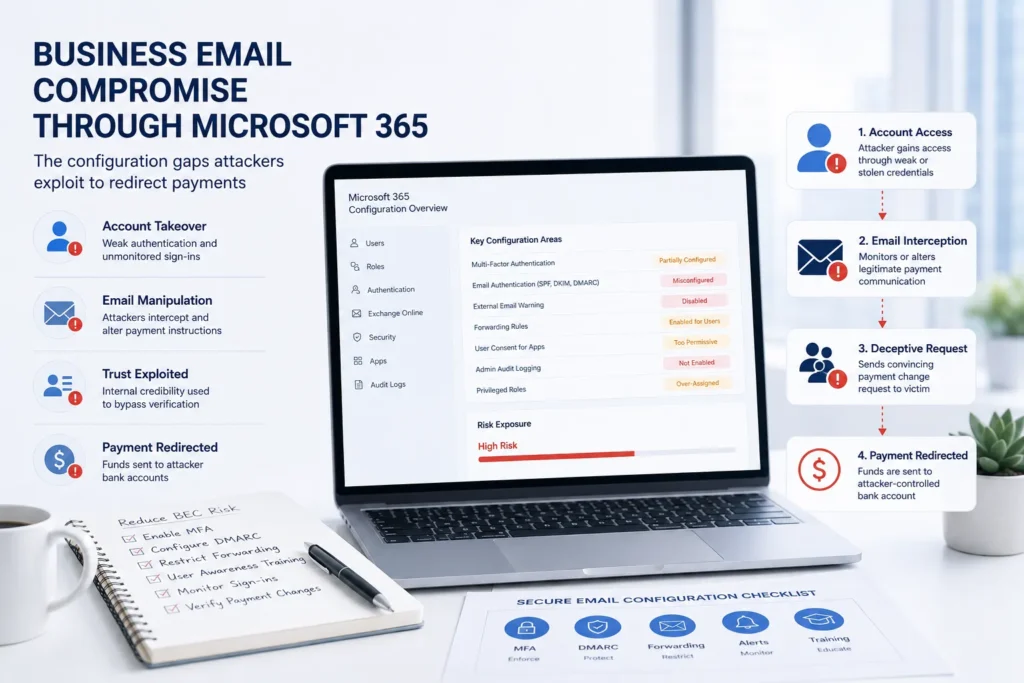
BEC attacks follow a consistent pattern that M365 configuration controls can disrupt at multiple points. The attacker phishes credentials, compromises the mailbox, studies the target’s email patterns, financial relationships, and pending transactions, impersonates the target or a trusted contact to redirect a payment or extract sensitive data, and then covers their tracks. Each stage of this attack chain has a corresponding M365 control that raises the cost of execution: MFA breaks the credential compromise, Defender for Office 365 anti-phishing controls reduce the likelihood of the credential phish succeeding in the first place, auto-forwarding blocks prevent the passive mailbox monitoring, and audit logging ensures the compromise is detectable.
- Domain spoofing is a BEC variant that does not require compromising an actual M365 account. The attacker registers a domain similar to the target organization’s domain and sends email that appears to come from a legitimate address. SPF, DKIM, and DMARC records are the technical controls that allow receiving mail servers to verify whether an email claiming to come from a domain actually originated from an authorized sending source. An organization with properly configured email authentication rejects or quarantines email that spoofs its domain. An organization with misconfigured or absent authentication records allows spoofed email to reach recipients unfiltered.
- Inbox rules set by attackers after account compromise are the most commonly overlooked persistence mechanism in BEC investigations. After gaining access to a mailbox, the attacker creates rules that automatically forward copies of incoming email to an external address, or that move specific categories of email to obscure folders where the legitimate user is unlikely to notice them. These rules persist after the attacker’s session ends, continuing to exfiltrate email silently. The rules are visible to an administrator reviewing the affected mailbox but are rarely noticed by the legitimate user whose inbox behavior has not changed noticeably. Monitoring for new inbox rule creation across the tenant, and blocking external auto-forwarding by default, are the controls that detect and prevent this technique.
- Attackers study compromised mailboxes for days or weeks before executing the fraud. The time between initial mailbox compromise and the fraudulent transaction that triggers detection is often measured in weeks, not hours. The attacker reads pending invoices, active wire transfer discussions, and vendor payment communications to identify the right moment to intervene. They learn the communication style of the compromised user and the financial workflows of the organization. The longer the undetected access persists, the more convincingly the attacker can impersonate the legitimate user or a trusted contact. Audit logging that surfaces suspicious mailbox access, sign-in risk policies that detect anomalous authentication, and MFA enforcement that requires re-authentication for high-risk sign-in contexts all shorten the window of undetected access.
- Vendor email compromise targets an organization through a compromised vendor account rather than through the organization’s own M365 tenant. The attacker compromises the email account of a vendor, partner, or client that has a legitimate payment relationship with the target organization, then uses that compromised account to modify payment instructions, redirect invoices, or intercept transaction communications. This variant is harder to prevent through M365 configuration because the attacker is using a legitimately authenticated external account. The control is a process control: calling the vendor on a known phone number to verify any change to payment instructions, regardless of how convincing the email appears.
How BEC Attacks Exploit M365 Gaps
The credential phish and mailbox compromise
The most common BEC attack chain begins with a phishing email designed to steal the target’s M365 credentials. The phishing email typically contains a link to a page that visually replicates the Microsoft 365 login interface. The user enters their username and password, which the attacker captures. In tenants without MFA enforcement, these captured credentials are immediately usable: the attacker authenticates to the target’s M365 account and has full access to the mailbox, SharePoint content, and Teams messages. The entire initial compromise takes as long as it takes the user to click the link and enter their credentials.
Modern phishing infrastructure has evolved to handle MFA-protected accounts through adversary-in-the-middle (AiTM) proxy techniques. An AiTM phishing page sits between the victim and the real Microsoft login service, relaying the authentication in real time and capturing the session cookie that results from a successful MFA authentication. This technique bypasses standard MFA methods including SMS codes and authenticator apps. Phishing-resistant authentication methods, specifically FIDO2 hardware security keys, are not vulnerable to AiTM proxy attacks because the key’s authentication is cryptographically bound to the specific domain it was registered for. For the highest-risk accounts, including finance personnel and executives who handle wire transfer approvals, FIDO2 authentication is the control that stops the AiTM attack.
The auto-forward exfiltration loop
Once inside a compromised mailbox, one of the first actions the attacker takes is establishing passive exfiltration through inbox rules or mailbox forwarding. An inbox rule that forwards all mail to an external address, or that copies mail matching specific keywords such as invoice, payment, wire, or transfer to the attacker’s collection account, allows the attacker to monitor the mailbox continuously without maintaining an active authenticated session. This passive monitoring is low-risk from the attacker’s perspective: it does not generate anomalous login events because no authentication is required after the rule is set.
Blocking auto-forwarding to external addresses at the tenant level through a mail flow transport rule is the control that breaks this technique. The transport rule intercepts outbound messages that are the result of auto-forwarding and blocks them before delivery, regardless of whether the forwarding was set up by an attacker or by a user for a legitimate purpose. Legitimate business needs for external forwarding are managed through exceptions that require explicit administrator approval, which creates an auditable record of authorized forwarding. This configuration change has no visible effect on normal user email behavior; users sending email manually are not affected by the transport rule.
Domain spoofing and DMARC
Email authentication is a set of DNS records that allow receiving mail servers to verify whether email claiming to come from a domain was actually sent by an authorized source. SPF (Sender Policy Framework) lists the IP addresses and mail servers authorized to send email on behalf of the domain. DKIM (DomainKeys Identified Mail) adds a cryptographic signature to each outgoing message that receiving servers can verify against the public key published in DNS. DMARC (Domain-based Message Authentication, Reporting, and Conformance) specifies what the receiving server should do with messages that fail SPF and DKIM verification, and provides a reporting mechanism that sends authentication failure reports back to the domain owner.
An organization with a DMARC policy set to reject instructs receiving mail servers to reject any email that claims to come from its domain but fails SPF and DKIM verification. This prevents spoofed email using the organization’s domain from reaching recipients at other organizations, breaking the domain spoofing variant of BEC. Configuring SPF, DKIM, and DMARC correctly for every accepted domain in the M365 tenant is a technical task that requires DNS access and a specific implementation sequence: SPF must be configured first, DKIM enabled and DNS records published, both verified as working, and then DMARC deployed progressively from a monitoring-only policy through quarantine to reject. Armour Cybersecurity configures and validates email authentication for every accepted domain as part of the Exchange Online hardening phase of an M365 optimization engagement.
Across the 260+ organizations Armour Cybersecurity protects in 52+ industries, the BEC cases that reach a fraudulent payment almost never involve a novel technique. They involve a tenant where MFA had an exception, DMARC was never moved past monitoring, or external auto-forwarding was never blocked, the same handful of defaults, left open, that turn a single phished password into a six-figure wire.
Frequently Asked Questions
Does Microsoft Defender for Office 365 prevent BEC?
Microsoft Defender for Office 365 provides anti-phishing protection that reduces the likelihood of credential-harvesting phishing attacks succeeding. It includes impersonation protection that detects when senders are attempting to impersonate specific users or domains, and mailbox intelligence that learns the communication patterns of each mailbox to identify anomalous messages. These controls reduce the attack surface but do not eliminate the risk. Defender for Office 365 does not prevent an attacker who has already obtained valid credentials from logging into the mailbox, does not block auto-forwarding rules set by the attacker post-compromise, and does not enforce MFA or conditional access. It is one layer of defense in a layered M365 security configuration, not a standalone BEC prevention solution.
What is the most common BEC scenario and how does it end?
The most common BEC scenario in the mid-market is the accounts payable redirect: the attacker compromises a finance team member’s email account or spoofs a vendor’s email address, then sends a message to the accounts payable team claiming that the vendor’s bank account information has changed and requesting that upcoming payments be directed to a new account. The message is timed to coincide with a legitimate pending payment, referencing correct invoice numbers and amounts learned from the compromised mailbox. The accounts payable team, receiving a message that appears to come from a known vendor contact with accurate context, changes the payment details and processes the next payment to the attacker’s account. The fraud is discovered when the legitimate vendor follows up on the unpaid invoice. Recovery depends on how quickly the fraudulent transfer is identified and whether the receiving bank can be reached before the funds are withdrawn or moved.
Can we detect if our M365 tenant is already compromised?
Indicators of an active or past M365 compromise include inbox rules forwarding to external addresses that the legitimate user did not create, sign-in events from locations, IP addresses, or devices inconsistent with the user’s normal patterns, OAuth applications with broad mailbox permissions that the user does not recognize, and email sent from the account that the user has no record of sending. The Microsoft Defender portal provides tools for investigating these indicators, including the unified audit log, the sign-in logs in Entra ID, and threat explorer in Defender for Office 365. An M365 security assessment includes a review of the tenant for indicators of compromise alongside the configuration gap analysis, identifying both the controls that need to be implemented going forward and any evidence of historical or ongoing compromise that needs to be investigated and remediated.
What process controls complement M365 technical controls for BEC prevention?
Technical controls in M365 reduce the attack surface but cannot prevent every BEC scenario, particularly vendor email compromise that uses a legitimately authenticated external account. Process controls that complement the technical controls include a call-back verification requirement for any change to payment instructions, using a verified phone number from a source other than the email requesting the change; a dual-approval requirement for wire transfers above a defined threshold; a policy that accounts payable staff do not act on payment instruction changes received solely via email without a secondary verification step; and periodic awareness training for finance staff covering the BEC scenarios most relevant to their role. The combination of technical controls that close M365 configuration gaps and process controls that add human verification to high-risk financial transactions provides defense in depth against all BEC variants.
The Bottom Line
Business email compromise is not a sophisticated-malware problem; it is a configuration and process problem, and that is what makes it both common and preventable. The attacks that drain six figures out of a mid-market business run through the same short list of M365 gaps every time: MFA that was never fully enforced, email authentication that never reached a reject policy, external auto-forwarding that was never blocked, and audit logging that never surfaced the intrusion. Closing those gaps breaks the attack chain at multiple points without changing anything about how staff send email day to day, and pairing them with call-back and dual-approval controls on payment changes covers the vendor-compromise variant that configuration alone cannot. Armour Cybersecurity’s M365 optimization engagement hardens each of these surfaces and validates email authentication for every domain, so a single phished password stops being one careless click away from a fraudulent wire.
About the author
David Chernitzky is the CEO and Co-Founder of Armour Cybersecurity, a Toronto-based firm that protects organizations across North America from advanced cyber threats. He brings more than 25 years of cybersecurity and military cyber intelligence experience, having served as an officer in an elite technology unit before co-founding Armour. Armour’s team of military-intelligence veterans and senior advisors serves 260+ clients across 52+ industries with a 97% client retention rate. Learn more about Armour Cybersecurity.